
The leader in population intelligence.
We provide past, present, and predictive insights on how the total population moves throughout the physical world. Everywhere. All the time.
We provide past, present, and predictive insights on how the total population moves throughout the physical world. Everywhere. All the time.
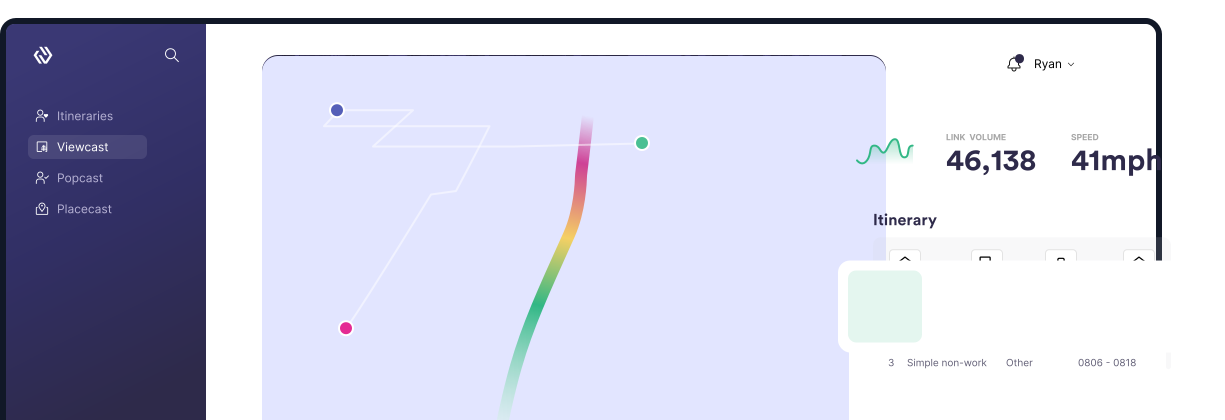






Easy access to a clear, representative view of total population insights enables businesses to make decisions based on real human behavior. Leveraging geospatial technology and exceptional data scientists, engineers, and UX Experts, Motionworks® curates the highest quality data sources available to create a robust, digital representation of the full population week-over-week.


Who is my target audience and where can I best reach them?

Who is visiting our locations? How long do they stay? And how can I get them to come back?

Where and how are people moving around our region and what decisions can we make to improve our city in the future?

Who is visiting our location? How are we performing versus our competitors? And where should we build our next location?
Our data science discipline was designed to solve for the population as a whole. How do ALL people move around the US to quantify ALL journeys ALL the time. Our products are fully-baked, statistically-representative measurement solutions. Motionworks® curates numerous data sets and calibrates them to thousands of first-party data sets to solve for the highest-level population questions as well as the most granular, local and regional analytics.

Population movement on every roadway, pedestrian pathway and inside every venue – all the time - vs. device captures in a single polygon.
Entire population – where they are, and sometimes, more importantly, where they aren’t.
Providing 3 years of historical data rather a snapshot in time once a polygon is established.
Dashboards, direct delivery, dynamically refreshed API feeds or bulk data transfers via S3 or FTP as frequently as your use case requires.